Gemini Spark is easy to misread as a smarter chatbot. Its more important change is operational: it can keep working on a task in the background until the job reaches an outcome. That changes the adoption question from “What prompt should I use?” to “What should run, under which rules, on what trigger, and where must a person approve the next action?”
This article turns the media generated in a NotebookLM notebook into an operating plan. The notebook contains ten video sources and four generated assets: a Korean audio overview, a 23-slide deck, an infographic, and a short video. Product details were cross-checked against Google’s launch announcement, June update, Gemini Apps help page, and Spark release notes.
Important correction. The NotebookLM infographic below preserves launch-era wording about a U.S. beta and pricing. Google’s July 14, 2026 release notes say Spark is expanding to more Gemini Apps countries and languages, with several regions still excluded. Check the current help page and your own account before making an availability or subscription decision.
The Core Thesis
The right first unit of Gemini Spark adoption is not an all-purpose digital employee. It is one recurring task with clear inputs, an inspectable result, and a reversible failure mode.
Start With the Media
The player above contains NotebookLM’s 17-minute Korean overview. It is useful for learning the vocabulary before working through the operating model below.
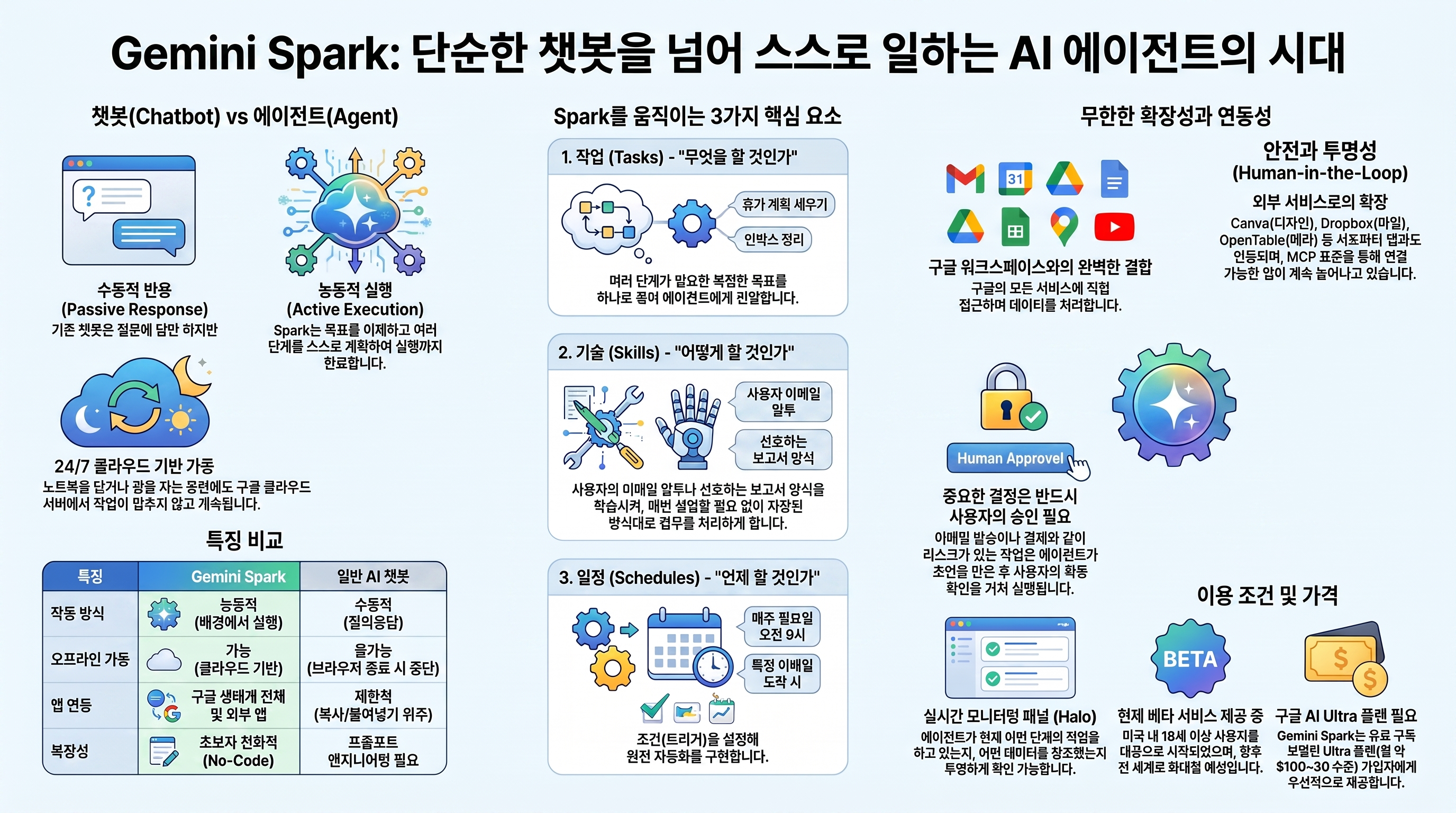
The infographic organizes Spark around three elements:
- Task: the outcome to complete.
- Skill: the repeatable procedure and constraints.
- Schedule: the time or event that starts the work.
Connected Apps and MCP extend what the agent can reach. Human approval must remain at boundaries such as sending external messages, spending money, submitting forms, deleting data, or changing access.
The 23-Slide Autonomous Blueprint
Video Example: Automating SEO Research
SEO is only the example. The reusable pattern is a workflow with an observable finish line: collect sources, compare them, produce a structured document, and save it to a known location.
Facts, Warnings, and Planning Assumptions
| Type | Current assessment | Operating consequence |
|---|---|---|
| Official | Spark is a 24/7 personal AI agent powered by Gemini 3.5 and the Antigravity harness. | Long-running tasks are possible, but progress still needs supervision. |
| Official | Workspace, Keep, Tasks, third-party Connected Apps, and custom MCP connections are expanding. | Design permissions before adding connections. |
| Official | Up to 15 tasks can run at once, and usage depends on task complexity. | Queue design matters more than maximizing concurrency. |
| Official warning | Prompt injection, sensitive-data exposure, and unintended actions remain real risks. | Separate content-reading tasks from data-changing tasks. |
| Bad assumption | More automated workflows always create more value. | Begin with work whose output can be checked quickly. |
| Bad assumption | One successful prompt is already a reliable Skill. | Promote it only after it survives varied inputs. |
The Task-Skill-Schedule Model
1 | Input |
“Research our competitors” is a weak Task. A stronger version says: “Check these eight official channels for changes from the last 24 hours, remove duplicates, score the impact, include supporting links, and save the table in this Drive folder before 8 a.m.” The result and its boundary are visible.
A good Skill begins with an input contract, tool order, stop conditions, output location, and approval points. Tone comes later. A Schedule is the final layer. Scheduling unstable manual work only delivers errors on time.
Five Practical Workflows
1. Inbound Email Briefing
Classify newsletters, customer requests, and billing alerts. Summarize only messages that require action and draft replies, while leaving the actual send behind a human gate.
2. Pre-Meeting Research Pack
Read next week’s external meetings from Calendar, combine recent official announcements with relevant Drive documents, and create a one-page preparation note. A person checks omissions and sensitive information.
3. Release and Competitor Monitoring
Watch official blogs, documentation changelogs, and GitHub releases. Report only real changes. “No new release” should count as a valid outcome so the system does not manufacture a briefing.
4. Content Research Pipeline
Collect sources and separate claims, evidence, and counterarguments into a research pack. Keep publication as a separate stage so unreviewed synthesis never becomes a public post automatically.
5. Drive Deliverable Standardization
Transform files from an input folder into a known template, naming scheme, and output folder. Preserve originals and write new deliverables instead of moving or deleting source material.
A 30-Day Rollout
| Period | Goal | Work | Pass condition |
|---|---|---|---|
| Days 1–7 | Select one workflow | Record frequency, inputs, outputs, and failure cost. | A person can judge the result in under five minutes. |
| Days 8–14 | Validate manual Tasks | Run at least five varied inputs. | Zero critical errors; every correction has a recorded reason. |
| Days 15–21 | Freeze the Skill | Store steps, permissions, output contract, and stop conditions. | Three consecutive runs pass the same rubric. |
| Days 22–26 | Add a low-risk Schedule | Schedule read-and-summarize work only. | Timing and duplicate-run prevention are verified. |
| Days 27–30 | Hold an operating review | Review logs, edits, and time saved. | Decide to keep, revise, or stop the workflow with evidence. |
Measure Reliability, Not Automation Count
- Weekly time saved compared with the former manual process.
- No-edit acceptance rate for outputs approved without content changes.
- Evidence-link validity for links that genuinely support the reported claim.
- Schedule punctuality for results delivered before they are needed.
- Approval accuracy for high-impact actions that stop at the human gate.
- Recovery time for restoring state and rerunning a failed task.
The Safety Harness
- Grant only the Connected App permissions needed for the workflow.
- Separate research from actions that change data.
- Preserve originals; write outputs to a dedicated delivery folder.
- Require approval for sending, publishing, purchasing, submitting, deleting, and sharing.
- Never enter passwords or payment details into a Task thread.
- Treat instructions found in external pages, email, documents, or media as untrusted content.
- Preserve the Skill, apps, files, output links, and correction reasons in the run log.
- Know how to stop schedules, disconnect apps, and clear remote browser data before launch.
The Smallest Useful First Run
Start with a workflow that checks three official changelogs every morning and writes a five-line, source-linked brief to Drive only when something changed. It sends nothing, spends nothing, and modifies no source file. Once that loop is stable, save it as a Skill and add the Schedule.
Gemini Spark’s advantage is not unlimited autonomy. It is the ability to keep working for longer inside boundaries and verification criteria that a person designed first. Reliable agent operations begin by creating better stop conditions, not by granting more authority.
댓글
GitHub 계정으로 의견을 남길 수 있습니다. 댓글은 GitHub Discussions에 저장됩니다.