Once you use coding agents for recurring work, long prompts begin to feel like duplicated configuration. A Skill packages that procedure so an agent can discover and reuse it. The trouble starts when a Claude Skill is moved into Codex, or when the same folder is expected to behave identically in Antigravity and Grok.
The filenames all say SKILL.md. Is copying the directory enough?
Short answer: often for the core instructions, but not for the complete behavior. Discovery, invocation policy, permission semantics, variable expansion, subagents, and UI metadata are product dialects layered on top of a shared format.
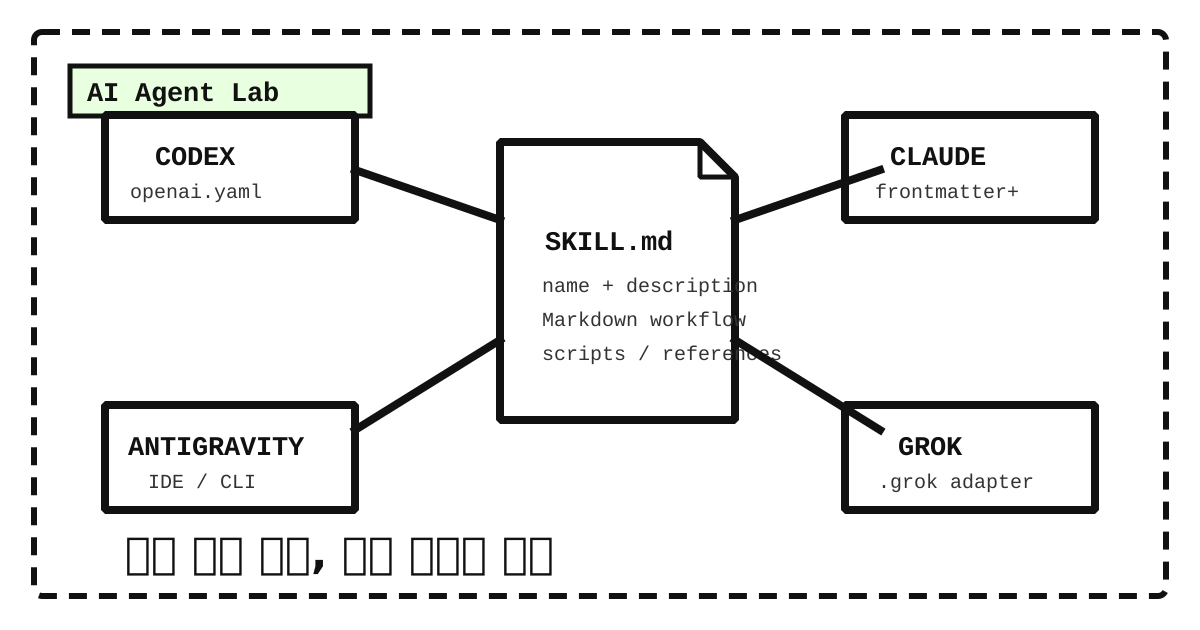
The shared core is the Agent Skills format
Codex, Claude Code, Google Antigravity, and Grok Build all consume structures from the Agent Skills family. A skill begins with YAML frontmatter in SKILL.md, followed by Markdown instructions. It can also carry scripts/, references/, and assets/.
1 | my-skill/ |
The Agent Skills specification defines name, description, license, compatibility, metadata, and the experimental allowed-tools field. A valid name uses lowercase letters, numbers, and hyphens and matches the parent directory. The description should say both what the skill does and when it should be used.
This conservative core travels well:
1 | --- |
Keeping detailed material in references/ rather than stuffing everything into the entrypoint also works across products. Each implementation relies, in some form, on progressive disclosure: metadata is visible first; the complete instructions and supporting resources load only when the skill is relevant.
Discovery paths are already different
The table below reflects official documentation checked on September 8, 2026. Antigravity is split into IDE and CLI rows because its Agent Skills and newer CLI plugin documentation describe different local shapes.
| Product | Project or workspace | User-wide | Main extension surface |
|---|---|---|---|
| Codex | .agents/skills/<name>/SKILL.md |
$CODEX_HOME/skills/<name>/ (usually ~/.codex/skills) |
agents/openai.yaml |
| Claude Code | .claude/skills/<name>/SKILL.md |
~/.claude/skills/<name>/ |
Frontmatter and body expansion |
| Antigravity IDE | .agents/skills/<name>/SKILL.md |
~/.gemini/config/skills/<name>/ |
Standards-oriented Skill folders |
| Antigravity CLI | .agents/skills/*.md |
~/.gemini/antigravity-cli/skills/ |
CLI plugins and slash commands |
| Grok Build | .grok/skills/<name>/SKILL.md |
~/.grok/skills/<name>/ |
Invocation control, path filters, Claude compatibility |
Codex currently centers project skills on .agents/skills and personal skills on $CODEX_HOME/skills. Compatibility locations may also appear across releases, so installers should verify the running Codex catalog rather than assuming that every client scans the same home directory. The current first-party Codex skill-creator material demonstrates the structure and default personal destination.
Codex separates UI metadata from the workflow
A Codex SKILL.md can stay focused on name, description, and the actual procedure. Codex-specific interface information—display name, icons, short description, default prompt, implicit-invocation policy, and tool dependencies—can live in agents/openai.yaml.
That separation is useful for portability. The workflow remains in the common Skill and its references, while Codex interface behavior stays in a thin adapter. Tool dependencies in openai.yaml, however, should not be treated as an independent permission boundary.
Claude Code has the broadest execution dialect
Claude Code layers a substantial runtime vocabulary onto the common format. Its current documentation includes fields such as when_to_use, argument-hint, arguments, disable-model-invocation, user-invocable, allowed-tools, disallowed-tools, model, effort, context, agent, background, hooks, paths, and shell. It also supports $ARGUMENTS, positional and named arguments, ${CLAUDE_SKILL_DIR}, ${CLAUDE_PROJECT_DIR}, and dynamic command-output injection. See the Claude Code Skills documentation.
But “works in Claude Code” is not equivalent to “uploads to claude.ai or the Skills API.” Those upload paths accept the six Agent Skills fields: name, description, license, compatibility, metadata, and allowed-tools. A Claude Code-only key such as argument-hint can make packaging or upload fail. A portable release therefore benefits from a standards-only core and a separate Claude Code adapter.
Antigravity requires a surface decision first
The Antigravity IDE Agent Skills documentation places workspace skills in .agents/skills/<skill-folder>/SKILL.md and global skills in ~/.gemini/config/skills/<skill-folder>/, with backward compatibility for .agent/skills. See Antigravity Agent Skills.
The Antigravity CLI plugin documentation, by contrast, describes single Markdown entries under workspace .agents/skills/ and a global ~/.gemini/antigravity-cli/skills/ location. “For Antigravity” is therefore incomplete: an adapter should name whether it targets the IDE or the CLI. A folder-based standards core can remain authoritative while the CLI gets a small command entrypoint.
Grok Skills and Grok Build are different surfaces
Grok Skills on the web, iOS, and Android are user-facing saved capabilities created through conversation or file upload. Repository-oriented SKILL.md behavior belongs to Grok Build. See the Grok Skills announcement and the Grok Build Skills documentation.
Grok Build discovers .grok/skills and ~/.grok/skills and reads extensions such as when-to-use, paths, argument-hint, user-invocable, and disable-model-invocation. Its documentation also says that it reads Claude Code skills, plugins, agents, hooks, MCP configuration, CLAUDE.md, and .claude/rules without additional setup. That can make a Claude Code repository usable without copying its skills.
Syntax compatibility still does not guarantee matching security behavior. Grok Build explicitly states that allowed-tools does not grant or restrict tools. Treating it as Claude Code-style preapproval would create a missing permission boundary.
Test three kinds of compatibility
The common standard is an intersection. Invocation, permission, UI, and subagent features are dialects. A file loading successfully proves only the first of three questions:
- Syntax compatibility: can the client parse the YAML and Markdown?
- Discovery compatibility: does it find the Skill in the expected location and invoke it at the right time?
- Execution compatibility: do variables, scripts, tool rules, and subagents carry the same meaning?
This separation explains the familiar failure mode in which a Skill appears in a menu but behaves differently after invocation.
A safe conversion policy
- Begin the common frontmatter with
name,description,license,compatibility, andmetadata. - Never rely on
allowed-toolsas the only safety control across implementations. - Keep the folder and
namein the same lowercase hyphenated form. - Move product-specific variables and command injection into adapters.
- Separate automatic invocation, subagents, hooks, and UI configuration from the common workflow.
- Use
scripts/,references/, andassets/as portable support directories. - State shell, package, and network requirements in both
compatibilityand the instructions. - Test positive invocation, negative non-invocation, and dangerous-action behavior after conversion.
A reusable conversion prompt
1 | You are an Agent Skills format converter and compatibility auditor. |
Prefer a core plus adapters to four copies
One shared SKILL.md is enough for a writing guide or checklist. A Skill coupled to deployment, browser control, MCP, subagents, or hooks is more reliable as a common core plus product adapters.
Place the workflow and quality criteria in a shared references/workflow.md. Add agents/openai.yaml for Codex, Claude-specific frontmatter and ${CLAUDE_SKILL_DIR} where required, a command entrypoint for the Antigravity CLI, and .grok invocation settings for Grok Build. Workflow edits then happen once; platform differences remain thin and visible.
The Skill ecosystem is moving quickly. Recheck the target’s current official documentation during every real migration. As of September 2026, the safest strategy is to center the open Agent Skills specification and make every product-specific behavior explicit.
댓글
GitHub 계정으로 의견을 남길 수 있습니다. 댓글은 GitHub Discussions에 저장됩니다.